
Table of Contents
Buffer Time helps you manage booking gaps by setting a delay (in hours) before or after a booking.
It ensures you always have enough prep or cleanup time — no last-minute rush!
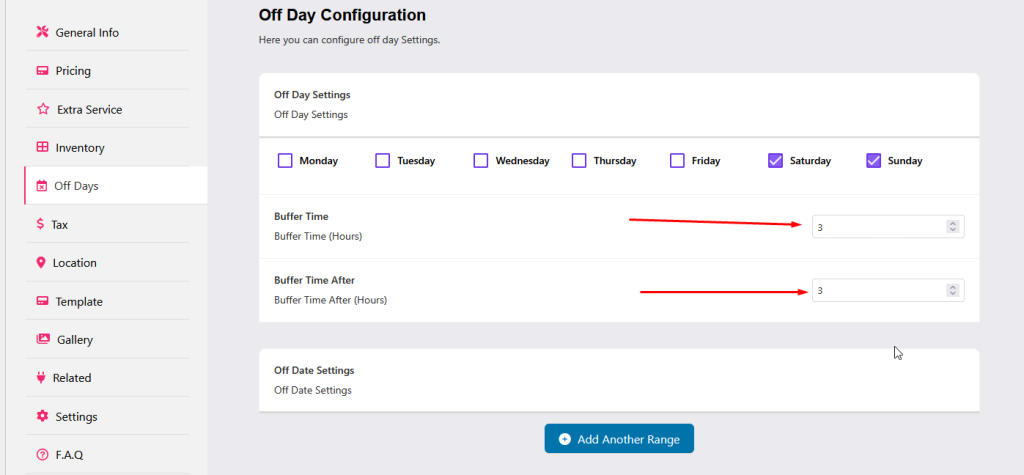
🔹 1. Before Buffer Time #
Purpose: Prevents bookings too close to the current time.
How it works:
- Bookings are allowed only after the set buffer hours from now.
- Same-day bookings are blocked if the buffer crosses today.
Example:
- Buffer Time = 4 hours
- Current time: 10:00 AM
➡ Bookings start from 2:00 PM onward
🔹 2. After Buffer Time #
Purpose: Ensures a break between two consecutive bookings.
How it works:
- Adds a waiting period after the end of the last booking.
- Next booking can start only after the buffer duration ends.
Example:
- Booking: Oct 10 (9 AM – 5 PM)
- Buffer: 2 hours
➡ Next booking available from 7 PM onward
If buffer < 24 hrs → same-day booking possible
If buffer > 24 hrs → next-day booking only
🔹 3. When Time Picker is Off #
Purpose: Works automatically based on date and timezone.
How it works:
- System checks the current time + buffer time.
- If the total stays within today → same-day booking allowed
- If it rolls into tomorrow → booking blocked for today
Example:
- Current time: 1 PM
- Buffer: 4 hrs → Ends 5 PM → ✅ Booking allowed today
- Buffer: 14 hrs → Ends next day → ❌ Booking not allowed today
✅ Summary Table #
| Condition | Before Buffer | After Buffer |
|---|---|---|
| Input | Hours before booking | Hours after booking |
| Same-Day Booking | Not allowed | Depends on buffer (<24h = allowed) |
| Time Picker Off | Depends on time overlap | Depends on end date |
| Purpose | Prep time before booking | Cleanup time after booking |
💡 Notes #
- Use buffer time to maintain a smooth operational flow.
- You can set both Before and After buffer times.
- Setting buffer = 0 means no restriction — bookings are open anytime.


